DuoQ
Creative Director
DuoQ is an FPS e-dating sim where you use your real life voice to work (and flirt) with Tala, a mysterious stranger met in the fictional FPS game To the Heart. Together you’ll solve co-op challenges, learn about her IRL life, and answer the question: is she into you?
DuoQ was developed as my capstone project at USC with contributions from over 50 students across USC, Otis, Berklee, and Cal State Fullerton.
For this project I:
- Implemented the core voice input interaction system turning the player’s microphone input into parsable callouts for Tala’s AI systems
- Collaborated in making a custom GOAP solution to handle combat and puzzles
- Creating custom dialogue import tools to support fast iteration times
- Programatic interactive dialogue UI
Goal Oriented Action Planning with Priority
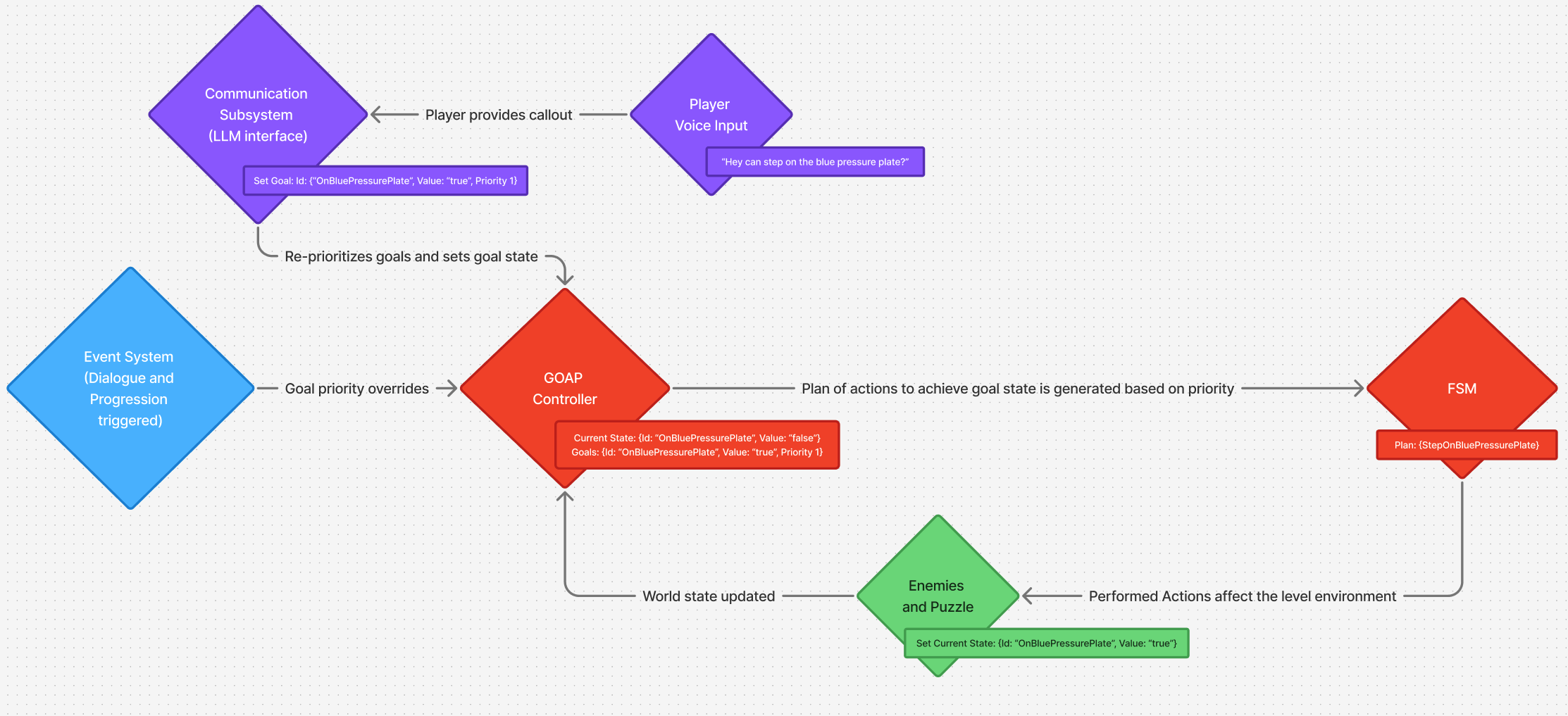
Tala’s AI controller uses a variant on a traditional GOAP system to decide which behaviour to perform. Every atom within the goal state contains an identifier, desired value (in our case all atoms used boolean values), and a priority. The priority is used as an additional heuristic to action costs when creating plans to ensure high cost high importance goals are generally performed before low cost low importance goals (e.g. running to cover while at low health instead of reloading). Additional atoms are dynamically added and removed from the world state (along with default goal atoms and actions) as Tala encounters and defeats enemies or puzzle elements.
The real magic that makes Tala work is the reprioritization of the goal state. When the player makes a callout, their transcribed voice plus the current goal state is sent to an LLM endpoint. The LLM responds with a new prioritization of goals. Tala’s goal state is then updated and then a new set of plans is created with the new priorities. The LLM is also given the ability to change the desired value of certain atoms to decide things like whether or not Tala should be standing on a pressure plate.
The below video shows a walkthrough showing off these features in action.
Dialogue System
DuoQ’s dialogue system at its core is pretty standard multioption branching dialogue. The main difference is the selection of which option is made by the LLM using the transcription of the player’s response as input. This allows for a single dialogue option to have as many responses as the narrative team wants to create as every possible option is not needed to be shown to the player. Player’s are shown different options that they can speak directly with or riff of off to get unique responses.
Backup Input
Players aren’t always able to provide voice input to play DuoQ, whether from a lack of microphone, a quiet space to play, or just not wanting to use their voice. I implemented a backup input system allowing players to hold the middle mouse button to select different dialogue options or prewritten callouts to communicate with Tala. This systems utilizes procedural UI with the placement being calculated at runtime based off the number of options to display.
Dialogue Implementation Tooling
Due to the open-ended nature of dialogue in DuoQ large amounts of voice over had to be rewritten or added across development. Google sheets was primarily used for editing dialogue but downloading the sheets as CSV files and importing them into Unreal Engine DataTables was a long and laborious process that slowed iteration to a crawl. As a result I created an editor utility action that would access the sheet directly from inside of Unreal Engine and import the dialogue from google sheets directly into the DataTables at the push of a button drastically speeding up iteration times. In addition to this tool I made a couple other scripts that would allow for easier location of where dialogue was getting triggered in the game world to speed up implementation times.